

Alchemyst AI - Chrome Extension for AI Models.
Have you been tired of explaining the same things to different AI Models over and over again while hoping between them, and still it just doesn’t get you. Well you don’t have to worry about that anymore, we got you covered. All you need is Alchemyst AI’s chrome extension and we handle the rest.Step By Step Setup
Let’s get you started with the extension quickly, I promise it will take less than a minute.Installation
- Download the Chrome Extension : Grab the extension file click here directly from the Chrome Web Store.
- Enable the Extension after installation.
Set Up Your API Key
- Visit Alchemyst AI : Platform
- Copy your API Key from the settings page.
- Open the ChatGPT tab in your browser and click the Alchemyst AI extension icon.
- Paste your API Key into the input field.
Enable Alchemyst AI Memory
After entering your key, look for the Alchemyst AI memory toggle icon inside the ChatGPT message box, Flip the switch to ON - and that’s it! Your chat sessions will now be enhanced with Alchemyst AI’s memory- preserving important context across conversations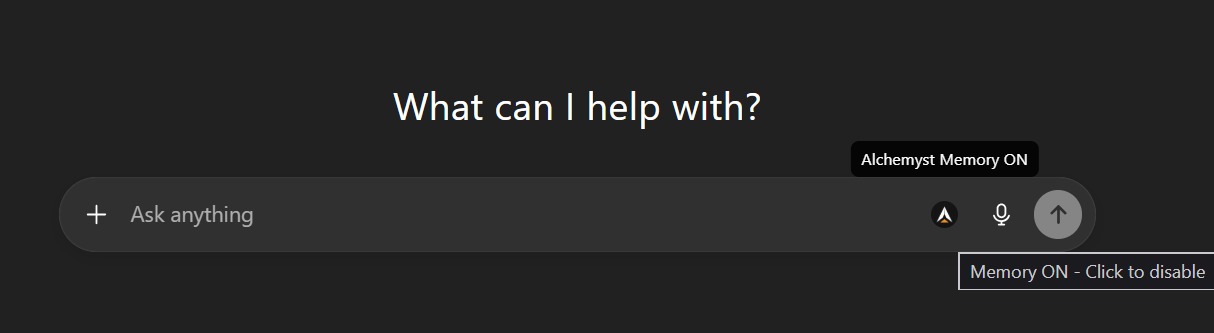
Saving context to the Alchemyst AI
- We can now save our conversations with chatGPT and Claude to Alchemyst’s memory.
-
to save the context.
- go to chatGPT or Claude conversation you want to save.
- click the extension icon in the browser toolbar.
- click the save context button in the extension popup.
- this will save the context to the Alchemyst AI memory.
- we can then use this context in our future conversations with chatGPT and Claude.
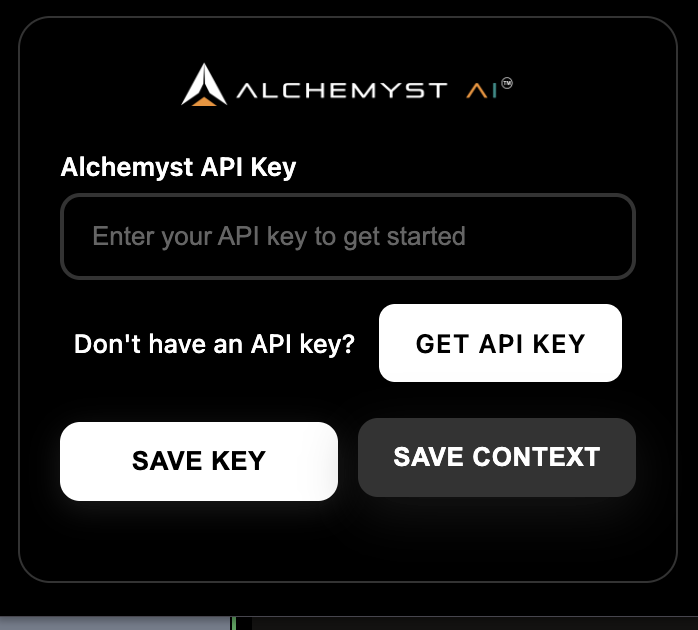
Add Memory :
To use memory you need to add memory, to do that just drag and drop any document you would like to store as memory, can be a pdf, text file, json file, doc file. Upload here : https://platform.getalchemystai.com/contextUsage Tips
- You can turn memory ON or OFF anytime by using the toggle in the message box.
- Upload any relevant context or documents you want to store as memory on the Platform
- If you update your API key, simply re-enter it through the extension popup.
Troubleshooting
- Memory not activating? Double-check your API key and ensure the extension is enabled in Chrome.
- Can’t see the icon? Refresh the LLM page after installation.