Introduction
Building an AI agent is the easy part. Debugging one is where most teams quietly give up.
When an agent reads files, calls external APIs, writes and revises code, and chains together dozens of reasoning steps, the traditional debugging methods breaks down completely. There's no stack trace that tells you why the agent retrieved the wrong document. There's no breakpoint you can set to pause the model mid-thought. What you get instead is a wall of raw JSON, hundreds of lines deep, and a vague sense that something went wrong somewhere between the user's question and the agent's confidently wrong answer.
This is the state of AI agent debugging today for most teams: manual, tedious, and fundamentally unscalable as agents grow more capable.
Two things change that. First, you need to know exactly what context the agent was given when it made a decision. Second, you need to be able to read the resulting interaction without a PhD in JSON parsing. This article walks through how pairing Alchemyst AI - a context and memory engine with Euphony - OpenAI's recently open-sourced conversation visualization tool, creates a debugging workflow that actually works in production.
The Real Problem: Why AI Agents Are So Hard to Debug
Debugging traditional software is a known discipline. You set breakpoints, read logs, step through call stacks, and narrow down the problem. The system does exactly what the code says.
AI agents break every one of those assumptions.
When an agent fails, the bug is almost never in the code. The code ran fine. The model ran fine. The failure is in the context - what the agent knew, what it didn't know, and what it thought it knew but had wrong. These are fundamentally different failure modes, and they require different tools to diagnose.
The most common ones:
Context Amnesia. The agent had access to a critical piece of information earlier in the session, a user preference, a constraint, a prior decision, but by the time it needed to act on it, that context had been pushed out of the window. The agent had no one telling it what to remember.
Context Bloat. The opposite problem. The agent was stuffed with everything that might be relevant - entire documents, full conversation histories, exhaustive metadata and the signal got buried in the noise. The correct answer was technically present in the context. The model just couldn't find it.
Retrieval Mismatch. The RAG pipeline pulled the wrong documents. The embedding similarity scores looked fine. But the retrieved chunks, while semantically adjacent, were missing the specific detail the agent actually needed. The agent answered confidently - and incorrectly - because the retrieval layer gave it plausible but wrong context.
Hallucination from Context Gaps. When the agent doesn't have the context to ground a response, it fills the gap. Not maliciously - it's doing what it was trained to do, which is produce a coherent, confident-sounding answer. The problem is that coherent and correct are not the same thing.
Without tooling that exposes exactly what went into the context window for a given query, diagnosing any of these issues means manually correlating logs across your embedding store, your retrieval pipeline, your prompt construction layer, and the model's output. For a five-step agent, that's painful. For a 50-step agent running across multiple tools and data sources, it's nearly impossible.
Alchemyst AI: Treating Context as an Engineering Problem
Most teams treat context as an afterthought- something you assemble in a prompt template and hope for the best. Alchemyst AI treats it as an engineering discipline with its own primitives, rules, and guarantees.
At its core, Alchemyst is a context and memory engine. It sits between your data layer and your model, and its job is to make sure that at every point in an agent's execution, the model sees exactly the context it needs - no more, no less.
Context Arithmetic
The central idea behind Alchemyst is Context Arithmetic - a dynamic rule system that determines what survives into the final context window at query time.
Instead of static retrieval ("find the top-K most similar chunks and pass them in"), Alchemyst performs set operations on your data:
Union: Combine context from multiple sources - a user's history, a relevant document, a live API response - into a single coherent input
Intersection: Only include context that satisfies multiple relevance criteria simultaneously - reducing noise significantly
Subtraction: Explicitly exclude context that's present but shouldn't influence this particular response - outdated records, superseded decisions, irrelevant metadata
The result is a context window that's been actively engineered for the query at hand, not passively assembled by a similarity search.
"Structure your context so that correct answers fall out naturally from arithmetic - not from clever prompts."
This distinction matters more than it sounds. A well-structured context window makes the model's job easier and its outputs more predictable. A bloated or misaligned context window forces the model to do implicit filtering work it wasn't designed to do - and fails silently when it gets it wrong.
Context Traces: Seeing Exactly What the Agent Knew
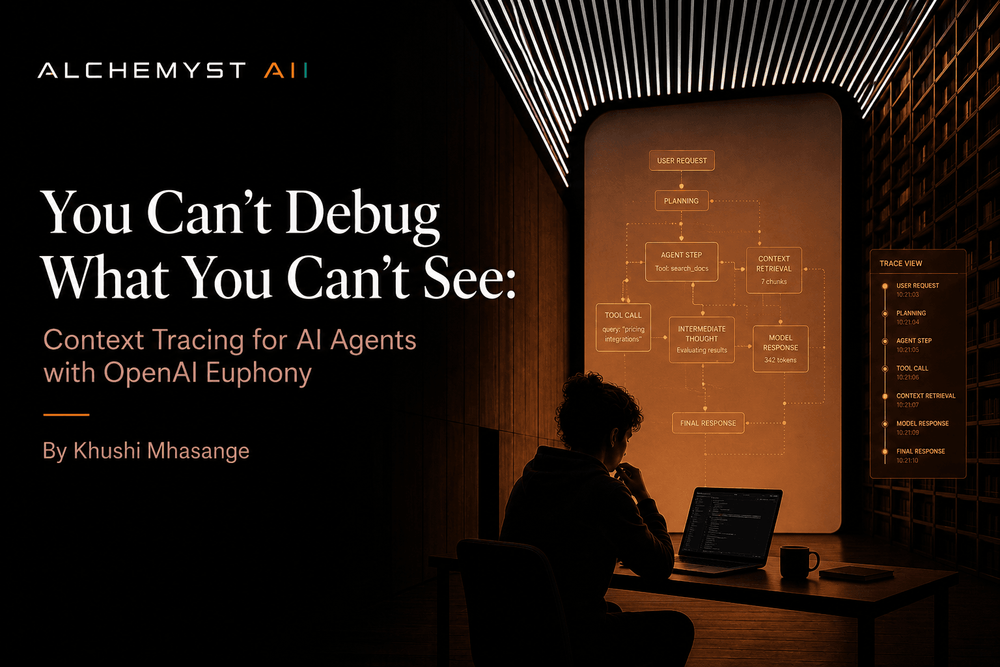
For debugging purposes, the most important feature Alchemyst provides is Context Traces.
Every time an agent query is processed, Alchemyst logs the exact data points that were selected, combined, filtered, and ranked before being passed to the model. Not a summary. Not a high-level description. The exact context, traceable back to its source in your organization's data.
This answers the question that sits at the root of almost every agent debugging session: What did the model actually know when it made this decision?
With Context Traces, you can tell immediately whether a failure was a retrieval problem (the wrong context was selected), a configuration problem (the Context Arithmetic rules need adjustment), or a model problem (the right context was provided but the model misinterpreted it). These are completely different problems with completely different fixes, and without tracing, you're guessing which one you're dealing with.
Euphony: Making Agent Conversations Readable
Context traces solve half the problem. You now know what the agent was given. But you still need to understand what it did with that context - how the conversation unfolded, where the reasoning went sideways, what the intermediate steps looked like.
That's what Euphony solves.
Recently open-sourced by OpenAI, Euphony is a browser-based visualization tool that takes structured chat data and Codex session logs and turns them into readable, interactive conversation timelines. It was built specifically for the kind of deeply nested, metadata-heavy JSON that AI agent sessions produce - the kind that's technically complete but practically unreadable without tooling.
What Euphony Ingests
Euphony is designed around two data formats:
Harmony conversations - structured multi-turn conversation logs with role assignments, message content, and attached metadata
Codex session logs - step-by-step logs of agent execution, including tool calls, reasoning steps, and intermediate outputs
Both formats are JSONL-based, making them easy to produce from any logging pipeline. If you're already logging your agent sessions, getting them into Euphony is mostly a formatting question.
Key Features
Conversation Timeline View. The primary interface renders the full agent session as a structured, browseable timeline - system prompt, user turns, assistant responses, tool calls, and tool results - in the order they happened. What was a 400-line JSON file becomes a readable conversation you can scroll through in under a minute.
Metadata Inspection. Every message and turn can carry attached metadata - retrieval scores, source documents, confidence markers, custom labels - and Euphony surfaces this inline. You don't need to cross-reference a separate log to see that a particular assistant response was grounded on a document with a 0.61 similarity score.
JMESPath Filtering. For large datasets with hundreds of sessions, Euphony supports JMESPath expressions to filter down to exactly the conversations you care about. Filter by outcome, by error type, by a specific tool that was called, or by any field in your metadata schema.
Focus Mode. Within a single session, focus mode lets you filter visible messages by role (system, user, assistant, tool), by recipient, or by content type. When you're trying to understand a specific tool-use chain inside a 200-turn session, this is the difference between five minutes and an hour.
Grid and Editor Modes. Grid view lets you skim across a dataset of sessions quickly - useful for spotting patterns across multiple agent runs. Editor mode gives you direct access to the underlying JSONL, so you can tweak a conversation, re-run it, and see how the change affects behavior.
The Combined Workflow: Alchemyst AI + Euphony
Used separately, each tool addresses half the problem. Used together, they close the loop entirely.
Here's what a debugging session looks like end to end:

Step 1 - Query and Context Retrieval
A user sends a query to the agent. Alchemyst's context engine kicks in, applying Context Arithmetic rules to determine exactly which data points from your organization's data are relevant. The resulting context - selected, filtered, and ranked - is assembled and passed to the model.
Critically, the entire context retrieval process is logged as a Context Trace. Every data point that was considered, every rule that was applied, every decision about what to include or exclude - it's all recorded.
Step 2 - Agent Execution and Logging
The agent runs. It reads the context, calls tools, reasons through intermediate steps, and produces a response. The full execution - user input, retrieved context, reasoning chain, tool calls, tool results, final output - is logged as a structured Harmony or Codex session file.
No special instrumentation required. If you're using Alchemyst, the context trace is already captured. The session log is a standard output of your agent runtime.
Step 3 - Visualization in Euphony
The developer loads the session log into Euphony. The raw JSON becomes a clean, browseable timeline. They can see each turn in sequence, inspect the metadata attached to each message, filter down to the specific reasoning steps they care about, and get a clear picture of how the conversation unfolded.
For a session that produced a bad output, this step typically takes the time from "I have no idea what happened" to "I can see exactly where it went wrong" down from hours to minutes.
Step 4 - Root Cause Diagnosis
Now the developer has both pieces:
The Context Trace from Alchemyst showing exactly what the agent knew at each step
The Conversation Timeline from Euphony showing exactly what the agent did with that knowledge
If the agent got the wrong answer because it was given the wrong context, that's visible in the Context Trace - an Alchemyst configuration issue. Adjust the Context Arithmetic rules, re-run, verify.
If the agent was given the right context but still produced the wrong output, that's visible in the conversation timeline - a prompt design or model behavior issue. The context was correct; the model's interpretation of it wasn't.
These are precise, actionable diagnoses. Not "something went wrong somewhere in the pipeline." Exactly what went wrong and where.
Why This Matters Beyond Engineering Teams
One underappreciated benefit of this workflow is that it makes AI agent debugging accessible to people who aren't engineers.
Raw JSON logs are not reviewable by product managers, QA testers, or domain experts. Euphony conversation timelines are. Alchemyst context traces are structured and human-readable by design.
This matters practically. The people who know best whether an agent's response was wrong are often not the people who can read a JSON log. A compliance reviewer, a domain expert, a client success manager - these people can look at a Euphony timeline, read through the conversation, see what context the agent had, and say with confidence: "It retrieved the wrong policy document" or "It ignored the constraint the user set in turn three."
That feedback loop - from domain expertise back to agent configuration - is what makes agent systems actually improve over time. Without readable tooling, that loop doesn't exist.
Conclusion
AI agents are only going to get more capable and more autonomous. The complexity of debugging them scales directly with that capability. Teams that don't invest in observability tooling now will find themselves flying blind as their agents take on higher-stakes tasks.
The combination of Alchemyst AI's context tracing and Euphony's conversation visualization doesn't just make debugging faster - it makes it tractable. It turns the AI black box into something you can actually reason about: a transparent, traceable system where failures have causes you can find and fixes you can verify.
If you're building agents that matter, this is what your debugging workflow should look like.